

Table of Contents
- What You'll Need Before Installing a Bluetooth Headset in Your Full-Face Helmet
- Preparing Your Full-Face Helmet for Bluetooth Installation
- Full-Face Helmet Bluetooth Speaker Placement and Positioning
- Motorcycle Helmet Bluetooth Microphone Installation and Placement
- Motorcycle Helmet Bluetooth Headset Setup: Wire Routing and Cable Management
- Testing Your Bluetooth Connection and Audio Quality
- Common Installation Mistakes to Avoid
- Helmet Safety, Warranty, and Modification Limits
- Frequently Asked Questions
Last Updated: October 13, 2026
Installing bluetooth headset in full face helmet gives you hands-free calls, music, and rider-to-rider communication without taking your hands off the bars. Done right, your headset stays secure with crystal-clear audio. Done wrong, you'll deal with loose wires, poor sound, and discomfort.

It's simpler than you think: no special tools or technical skills required, just a clear plan, the right headset, and about 30 minutes.
Below, we'll cover what to gather, how to prepare your helmet, where to position speakers and microphones, how to test everything before you ride, and the mistakes most riders make.
What You'll Need Before Installing a Bluetooth Headset in Your Full-Face Helmet
Gather these items before you start to save time and prevent frustration.
Tools and supplies:
- Your full-face helmet
- Your Bluetooth headset (we recommend the Daytona Helmets Motorcycle Bluetooth Headset for universal compatibility across helmet brands like Shoei, Arai, and HJC)
- Small flathead screwdriver
- Soft cloth or microfiber towel
- Flashlight or headlamp
- Velcro strips or adhesive pads (included with most headsets)
- Zip ties or cable clips for wire management
Optional but helpful:

- Small mirror to see inside the helmet
- Helmet padding removal tool (many come with your headset)
- Isopropyl alcohol wipes for cleaning mounting surfaces
Most Bluetooth headsets ship with mounting hardware included, so check your box before buying extra supplies. The Daytona Helmets system comes ready to go with all mounting brackets and adhesive pads.
Preparing Your Full-Face Helmet for Bluetooth Installation
Your helmet needs prep work before you install anything. This takes 10 minutes and prevents damage later.
Checking Interior Space and Helmet Type
Start by understanding your helmet's layout. Full-face helmets vary: some have removable cheek pads, others don't; some have speaker pockets built into the liner, others are solid foam.
Open your helmet and look inside. Check for:
- Removable cheek pads or padding
- Speaker pocket areas (recessed sections near ear level)
- Available space along the sides and top
- Wire routing channels or grooves in the padding
Different brands handle this differently. Shoei helmets often have more defined speaker pockets, Arai designs tend to have denser padding, and HJC models usually offer good interior space for routing wires. Daytona helmets work with universal mounting systems, so they're compatible with all these designs.

If your helmet has removable cheek pads, you can tuck wires behind them. If the padding is permanently glued, route wires along the surface instead.
Measure the space near each ear. Most speakers need about 2-3 inches of clearance; if space is tight, you may need to trim padding slightly.
Removing Cheek Pads and Removable Liners
Many full-face helmets have removable cheek pads. These pop out easily and give you room to work.
Locate the cheek pad edges at the sides of your face inside the helmet. Gently pull outward and downward; most come free with light pressure.
Some helmets use adhesive instead of clips.
Once removed, lay the cheek pads flat on a clean surface. You'll use the space behind them for wire routing.
Leave the main helmet liner in place unless your headset instructions say to remove it. The liner protects the foam shell and helps with sound quality.
Clean the interior surfaces where you'll mount adhesive pads. Use a dry cloth first, then an isopropyl alcohol wipe if the surface is oily.
Full-Face Helmet Bluetooth Speaker Placement and Positioning
Speaker placement makes or breaks your audio experience. Bad placement means muffled sound or one ear louder than the other.
Locating Speaker Pockets and Ear Position
Find where your ears sit inside the helmet. Put the helmet on without fastening it and mark the approximate ear position with your finger on the outside.
Most full-face helmets have speaker pockets or recessed areas just above and slightly forward of ear level. Speakers work best directly beside your ears, not behind them or too far forward.
Look for recessed areas or pockets near ear level, curved sections that follow your head's contour, and grooves that guide speaker placement.
If your helmet has built-in speaker pockets, use them. If not, mount speakers on the existing padding using adhesive pads or Velcro strips.
Position them just outside your ear canal, not pressed against your ear.
Adjusting for Comfort and Sound Quality
Test speaker placement before permanently mounting anything.
Put the helmet on and have someone hold a speaker in the position you're considering. Does it press uncomfortably against your ear? Does it feel secure? Can you hear clearly?
Adjust up or down, forward or back, to find the sweet spot where sound is clear and nothing presses hard against your head.
You'll wear this helmet for hours at a time, so comfort matters as much as audio quality.
Mark the final speaker position with a small piece of tape on the helmet interior to prevent confusion during permanent installation.
Test audio at realistic riding speeds.
Motorcycle Helmet Bluetooth Microphone Installation and Placement
Microphone placement affects call quality and wind noise. Poor placement means people can't hear you over road noise.
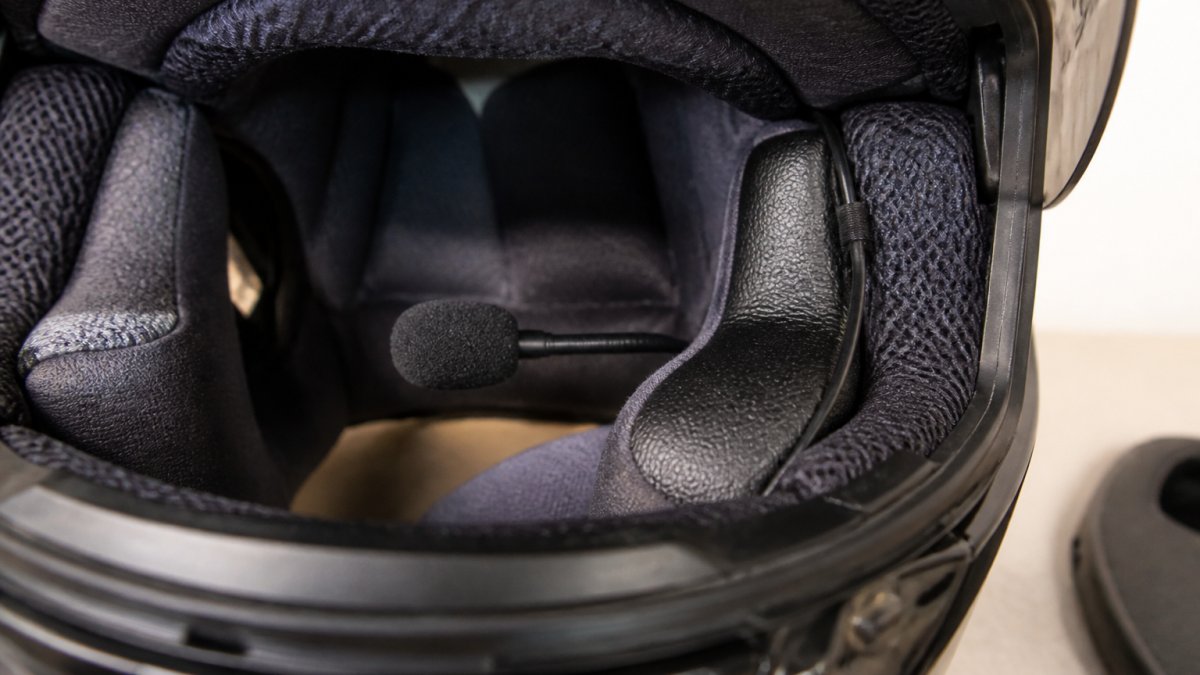
Choosing Between Boom and Wired Microphones
Most motorcycle Bluetooth headsets use one of two microphone styles: boom or wired.
Boom microphones extend toward your mouth on a flexible arm attached to the speaker or control unit.
Wired microphones are small capsules attached to a thin wire routed along the helmet's interior.
The Intercom Bluetooth Headset for Full-Face Helmets uses a wired microphone with noise-cancellation technology. It works across all full-face helmet brands because the thin wire routes easily without modifications.
Intercom Bluetooth Headset For Full-Face Helmets- Single Pack →
For full-face helmets, a wired microphone is less obtrusive and adds no bulk.
Position your microphone approximately 1-2 inches from the corner of your mouth.
Motorcycle Helmet Bluetooth Headset Setup: Wire Routing and Cable Management
Wire routing is where most installations go wrong. Loose wires rattle, shift, and eventually disconnect.
Start at the speaker location and trace a path down the side of the helmet.
Run wires behind the cheek pads if you removed them to hide and secure them.
Bring the microphone wire down from the speaker toward your mouth, along the side of the helmet interior where it won't contact your skin directly.
Route the control unit wire (if your headset has a separate control box) down the back of the helmet toward your neck.
Test wire routing with the helmet on. Move your head side to side and nod up and down. Wires should stay in place without pinching or pressing uncomfortably.
Testing Your Bluetooth Connection and Audio Quality
Before you ride, test everything thoroughly.
Pairing Your Headset and Phone
Turn on your Bluetooth headset. Most enter pairing mode automatically when first powered on; check your manual for the specific sequence.
On your phone, go to Bluetooth settings and look for your headset in the available devices list. It typically appears as "Daytona Bluetooth Headset" or similar.
Pair your phone first before a second device like a GPS unit. Most headsets support dual pairing, but one device at a time prevents confusion.
Once paired, test that your phone recognizes the headset as both a phone device and an audio device. Some phones list these separately.
Test the microphone by calling a friend. Ask if they hear you clearly and whether wind noise or helmet vibrations come through.
Conducting a Sound Test at Realistic Riding Conditions
Static testing in your garage doesn't tell you much. Test at real riding speeds.
Start with a short 10-minute ride at city speeds (25-35 mph). Listen for audio clarity: does music play at a reasonable volume? Can you hear notifications clearly?
Accelerate to highway speeds (55-65 mph) for a few minutes, where wind noise becomes a factor. Poor microphone position means wind rushing past; poor speaker position means you won't hear calls or music clearly.
Make a test call while riding. Verify the other person hears you without excessive background noise, and ask them to rate your audio quality on a scale of 1-10.
Make adjustments and test again. Most issues resolve with small position tweaks.
Common Installation Mistakes to Avoid
Learn from what other riders have done wrong.
Mounting speakers too far back. Speakers behind your ear level sound muffled and distant. Position them directly beside your ears.
Routing wires too loosely. Loose wires rattle and shift during rides.
Forgetting to clean mounting surfaces. Adhesive pads won't stick to dusty or oily surfaces. Clean thoroughly with a dry cloth and alcohol wipe first.
Skipping the test ride. Helmets feel different at speed, and wind noise, vibration, and pressure changes affect audio quality.
Not checking helmet fit after installation. Adding speakers and wires can change how your helmet sits.
Installing without reading your headset manual. Different headsets have different mounting requirements. Some use adhesive. Others use brackets. Some have specific wire routing paths.
Helmet Safety, Warranty, and Modification Limits
Installing a Bluetooth headset is a modification, so understand the implications.
Helmet safety remains your priority. A properly installed headset doesn't compromise safety; speakers and wires don't interfere with the foam shell or structural integrity.
Check your helmet's warranty. Approved methods usually don't void your warranty, but check your specific helmet's documentation to confirm.
Adhesive-mounted systems are reversible. Unlike drilling or gluing, adhesive pads and Velcro strips remove without permanent damage, so you can take your headset out cleanly.
Replace your helmet if it's damaged. If you crack the shell or damage the foam during installation, replace the helmet.
Installing a Bluetooth headset in your full-face helmet takes planning and care, but it's worth the effort. Helmet Shop carries universal Bluetooth headsets like the Daytona Helmets system that work with any full-face helmet from Shoei, Arai, HJC, or any other brand you ride.
Frequently Asked Questions
Can you install a Bluetooth headset in any full-face motorcycle helmet?
Most full-face helmets can accommodate a Bluetooth headset, but interior space and design vary. Check your helmet's interior layout for speaker pockets and enough room for the control unit and wires. Some helmets have pre-molded speaker pockets that make installation easier. If your helmet lacks these features, adhesive mounts and custom routing can work, but verify the helmet has adequate padding space to avoid pressure on your ears. Universal systems like the Daytona Helmets Motorcycle Bluetooth Headset are designed to integrate with virtually any helmet configuration without permanent modification.
Where should Bluetooth speakers sit inside a full-face helmet?
Speakers should position near your ear level, typically in the cheek pad area or dedicated speaker pockets. The goal is to align the speaker driver with your ear canal for optimal sound without pressing directly against your ear. Most full-face helmets have space above or beside the cheek pads. Test positioning before permanently securing speakers; speakers that sit too high or low will deliver muffled audio and create discomfort during long rides. Adjust speaker angle slightly forward to direct sound into your ear rather than against the helmet shell.
How do I install a microphone in a full-face helmet?
Wired microphones route along the interior chin bar toward the mouth area, typically secured with adhesive strips or small fasteners. Position the boom microphone 1-2 inches from your mouth to capture clear voice input while minimizing wind noise and helmet vibration. For full-face helmets, run the wire along the cheek pad seam and down the chin bar to keep it out of your line of sight. Test microphone placement before final installation; it should not interfere with your chin strap or create pressure points during wearing. Noise-cancelling microphones help filter road and wind noise for clearer intercom communication.
Will installing a Bluetooth headset affect my helmet's fit or safety?
Proper installation should not compromise helmet safety if you avoid permanent modifications to the shell structure. Keep the control unit and mounting bracket inside the helmet interior rather than drilling holes or cutting the outer shell. Ensure speaker and microphone placement does not create pressure points that affect fit or comfort during extended rides. The helmet should still fit snugly without the headset components shifting or creating gaps. Avoid modifying the helmet in ways that would void the manufacturer's warranty or safety certification.


